In this article
Thinkific builds the course now. It builds the landing page too.
The question is not whether it can host a course. The question is whether its newer marketing tools are strong enough to replace what you might already pay someone else to do, or whether they just give you more dashboards to check.

What Is Thinkific and Who Is It For?
Thinkific is a course-hosting platform that lets solo creators sell video courses, communities, memberships, and digital downloads, with a built-in site builder, landing pages, and email automation included on every paid plan, priced from $40 to $219 a month per thinkific.com/pricing. There is no free plan, only a 30-day free trial.
Thinkific launched in 2012 as a course-delivery platform, and for years that is mostly what it was: upload videos, build lessons, collect payment. That has changed. The current plan lineup adds a drag-and-drop site builder, conversion-focused landing pages, and built-in email automation to every tier, including the cheapest one. Thinkific reports that customers on the platform have earned $4.23 billion total and reached 214 million learners across more than 100 countries, per the company’s own published figures on thinkific.com/pricing.
That shift matters for a solo creator deciding what to build versus what to buy. A platform that only hosts a course leaves the lead capture and nurture work to you. A platform that also builds the landing page and sends the welcome email is doing more of the funnel for you, if those built-in tools are actually good enough to use.
This review runs Thinkific through the five places a creator funnel leaks: lead capture, email deliverability, offer clarity, checkout friction, and post-purchase follow-up, the same framework FunnelForOne applies to every tool review.
Does Thinkific Help You Capture Leads Before the Sale?
Thinkific includes a drag-and-drop site builder and conversion-focused landing pages on every paid plan, including Basic at $40/month, per thinkific.com/pricing. That is a real difference from course platforms that only offer a sales page. You can build an opt-in page for a lead magnet without adding a separate landing page tool.
This is the clearest upgrade in Thinkific’s current lineup compared to a pure course-hosting tool.
A solo creator running content marketing, paid traffic, or a podcast usually needs somewhere to send cold or warm traffic before the sale: a free guide, a mini-course, a quiz. That requires a landing page separate from the course sales page. Thinkific now builds that page directly into the platform, on every plan, not just the higher tiers.
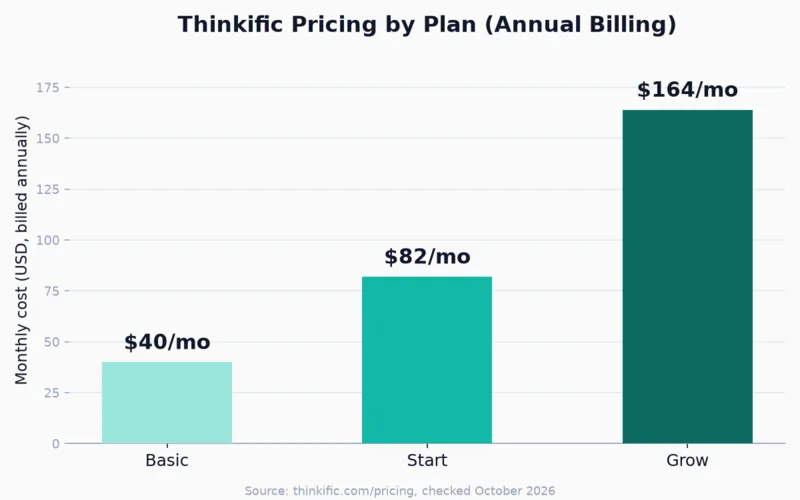
The pricing that comes with that page matters just as much as the page itself. Here is what each plan actually costs on annual billing:
The honest tradeoff: having a landing page builder is not the same as having a fully flexible one. Thinkific’s site builder is template-based, and the HTML/CSS editor that unlocks deeper customization is not available on Basic, only on Start and above, per Thinkific’s plan comparison. For a creator who wants a clean opt-in page fast, the included tool is usually enough. For a creator who wants precise control over layout and design, you will hit the edge of what Basic allows and need to either upgrade or add a tool like Carrd anyway.
How Does Thinkific Handle Email and Nurture Sequences?
Thinkific includes built-in email automation with ready-made templates and pre-built sequences on every plan, plus native integrations with ConvertKit, MailChimp, Constant Contact, AWeber, and ActiveCampaign without requiring Zapier, per thinkific.com/pricing. That covers more of the pre-sale nurture gap than most course platforms leave open.
Most course platforms treat email as an afterthought: a drip schedule for people who already enrolled, and nothing for the days before someone buys. Thinkific’s built-in email automation, included on every tier, is meant to cover more of that gap directly inside the platform.
The native integrations with five major email tools, without Zapier in the middle, is also a practical advantage. If you already run ConvertKit or ActiveCampaign, enrollment and purchase events can trigger your existing sequences without a third-party connector breaking silently.
Still deciding whether to run email inside Thinkific or through a dedicated tool? The ConvertKit vs MailerLite comparison breaks down which email platform fits a solo creator’s list size and budget, in case you decide to keep email separate.
The honest tradeoff: a built-in automation tool is not automatically as capable as a dedicated email platform with years of deliverability tuning behind it. Thinkific has not published its own open or deliverability rates, so there is no direct way to compare it against ConvertKit or Brevo on that measure. Treat the built-in automation as solid for welcome emails, abandoned-cart follow-up, and course drip content, and keep a dedicated tool in the loop if your list is large or your nurture sequences get complex.
Is Thinkific’s Course and Community Builder Good Enough to Sell With?
Thinkific’s course builder supports unlimited courses, quizzes, assignments, and completion certificates on Start and above, plus a built-in community feature (1 community on Basic and Start, 3 on Grow) for discussions, direct messages, and a private feed, per thinkific.com/pricing. Assignments, certificates, and advanced CSS editing are not available on the entry Basic plan.
The course builder itself is straightforward: drag-and-drop lesson creation, free or paid courses, drip-released content, and quizzes on every plan. Where it gets more interesting for a solo creator is the community feature, now bundled into every tier starting at Basic. A private feed, direct messages, and a weekly digest give you a lightweight way to keep students engaged between lessons, without adding a separate community tool.

Where Basic falls short: no completion certificates, no assignments, no advanced HTML/CSS editing, and no private or hidden courses. Those unlock on the Start plan at $82/month on annual billing, per Thinkific’s plan comparison. If your offer depends on graded assignments or a certificate as a selling point, common for professional training and coaching offers, budget for Start from day one rather than starting on Basic and hitting the wall later.
The honest tradeoff: Thinkific gives you more pre-built structure (courses, community, quizzes) out of the box than a narrower course-delivery tool. What you give up on the entry plan is deep design flexibility. The default templates are serviceable, not distinctive, until you reach the tier with the HTML/CSS editor.
Not sure if lead capture, email, or your checkout is the actual bottleneck in your funnel right now? The Solo Funnel Blueprint walks through each stage and tells you what to check before you commit to a new monthly subscription. Free. No pitch.
How Much Friction Is There at Checkout, and What Does Thinkific Cost to Process Payments?
Thinkific’s native checkout, TCommerce, includes order bumps, gifting, coupons, and automated abandoned-cart emails on every plan, per thinkific.com/pricing. Processing through Thinkific Payments runs roughly 2.9%, in line with standard Stripe or PayPal rates. Using Stripe or PayPal directly adds an extra third-party gateway fee that varies by plan.
Checkout friction is where Thinkific’s current lineup looks closer to a dedicated sales tool than a basic course host. Order bumps, gifting, coupon codes, and abandoned-cart recovery emails are included starting on Basic, the cheapest plan. Payment plans, which split a price into installments, and PayPal as a payment method are reserved for Start and above.

The fee structure takes a bit more attention. Thinkific’s own processor, Thinkific Payments, charges a rate the company describes as in line with Stripe and PayPal, roughly 2.9%, per thinkific.com/pricing. Route payments through Stripe or PayPal instead of Thinkific Payments, and an additional third-party gateway fee applies on top, with the exact amount varying by plan rather than a single flat number Thinkific states upfront.
The honest tradeoff: staying on Thinkific Payments avoids the extra gateway fee entirely, which is the simplest way to keep your checkout math clean. If you already have a Stripe or PayPal account with payout history or integrations you rely on, switching away from Thinkific Payments is still possible. Check the current extra-fee schedule before assuming it costs nothing to keep your existing processor.
What Happens After Someone Buys? Does Thinkific Help With Retention?
Thinkific includes affiliate reporting and basic analytics on every plan, plus communities for ongoing engagement, per thinkific.com/pricing. A branded mobile app is a paid add-on rather than included, and advanced analytics with custom dashboards require the Grow plan or above.
Post-purchase follow-up is the funnel stage most solo creators skip, and it is also where tool choice matters less than habit. Thinkific gives you a few things to work with here regardless of plan: affiliate tracking and reporting so other people can promote your course for a commission, basic sales and student dashboards showing revenue and completion, and the community feature for ongoing engagement after someone finishes a course.

What is missing on the lower tiers: a built-in mobile app. Thinkific sells its branded iOS and Android app as a separate add-on rather than a default feature on any self-serve plan, per thinkific.com/pricing. For a course that depends on students checking in daily, habit-based coaching, fitness, or language learning, that is worth pricing out before you commit to a plan.
The honest tradeoff: the affiliate program and community feature are genuine retention tools that most entry-level course platforms do not include at this price. The lack of a default mobile app, and the gate on advanced analytics until Grow, mean a creator optimizing hard for retention and repeat engagement will likely spend more than the $40 Basic sticker price suggests.
What Does Thinkific Cost at Each Plan Tier?
Thinkific’s three self-serve plans run $40, $82, and $164 a month on annual billing, equivalent to $54, $109, and $219 on monthly billing, per thinkific.com/pricing. A fourth plan, Plus, is custom-priced for larger operations. There is no free plan; every tier starts with a 30-day free trial.
| Plan | Price (annual / monthly billing) | Best for | Key limit |
|---|---|---|---|
| Basic | $40/mo ($54/mo monthly) | A first course and a growing audience | No certificates, assignments, or advanced page editing |
| Start | $82/mo ($109/mo monthly) | Selling with payment plans, certificates, and live coaching | Thinkific branding still shows; 1 community |
| Grow | $164/mo ($219/mo monthly) | Removing Thinkific branding and adding B2B sales | Phone support and API access start here |
| Plus | Custom pricing | Larger operations needing SSO, SCORM, or a branded app | Requires a sales conversation; not self-serve |
Prices per thinkific.com/pricing, checked October 2026. Every plan includes a 30-day free trial, and Basic, Start, and Grow can be upgraded, downgraded, or canceled at any time. Pricing and feature allocations change periodically; verify current rates before committing.
Who Should Use Thinkific (and Who Should Skip It)?
Thinkific is the right choice for a solo creator who wants a course platform, landing pages, and basic email automation in one tool without paying for a full all-in-one suite. It is the wrong choice for a creator who needs certificates, assignments, or payment plans immediately, since those require upgrading past the entry Basic plan.
Here is the diagnostic view, stage by stage:
| Funnel stage | Thinkific’s coverage | Limitation |
|---|---|---|
| Lead capture | Site builder and landing pages on every plan | HTML/CSS editor only on Start and above |
| Email delivery | Built-in automation plus 5 native integrations, no Zapier required | No published deliverability data to compare against dedicated tools |
| Offer clarity | Course builder, quizzes, community on every plan | Certificates, assignments, private courses start on Start |
| Checkout friction | Order bumps, coupons, abandoned-cart recovery on every plan | Extra gateway fee if using Stripe or PayPal instead of Thinkific Payments |
| Post-purchase | Affiliate program and communities on every plan | Mobile app is a paid add-on; advanced analytics require Grow |
Use Thinkific if:
- You want a course platform, a landing page builder, and basic email automation under one login, without the price of a full all-in-one suite
- You are launching your first course and do not yet need certificates, assignments, or payment plans
- You already use ConvertKit, MailChimp, Constant Contact, AWeber, or ActiveCampaign and want a native integration without Zapier
Skip Thinkific (or plan to upgrade quickly) if:
- Certificates or graded assignments are part of your offer from day one: budget for Start, not Basic
- Daily student check-ins matter to your course model: the mobile app is a separate paid add-on, not included
- You want deeper email marketing sophistication than built-in automation offers: pair Thinkific with a dedicated email tool, or look at an alternative course platform that bundles more of that in from the start
The clearest signal Thinkific is the wrong starting point: if you are still deciding whether your course idea will sell at all, the platform tier matters less than getting a validated offer in front of real people. Start on Basic, prove the course sells, then upgrade for the features your actual students are asking for.
Frequently Asked Questions
Is Thinkific worth it in 2026?
Thinkific is worth it for solo creators who want a course platform, landing pages, and basic email automation under one login, starting at $40 a month on annual billing, per thinkific.com/pricing. It is a weaker fit if your offer needs certificates, assignments, or payment plans immediately, since those require the $82 Start plan or higher.
Does Thinkific have a free plan?
No. Thinkific removed its free plan and now offers a 30-day free trial on every tier instead, per thinkific.com/pricing. You can build courses, test the community feature, and try the AI tools for the full trial period before paying anything.
How much does Thinkific charge in payment processing fees?
Thinkific’s own processor, Thinkific Payments, charges roughly 2.9%, which the company describes as in line with standard Stripe and PayPal rates, per thinkific.com/pricing. Routing payments through Stripe or PayPal instead adds an extra third-party gateway fee that varies by plan, so staying on Thinkific Payments is the simpler option for most solo creators.
Can Thinkific replace a dedicated email marketing tool?
Partially. Thinkific includes built-in email automation with templates and sequences on every plan, plus native integrations with ConvertKit, MailChimp, Constant Contact, AWeber, and ActiveCampaign, per thinkific.com/pricing. It has not published deliverability data to compare against dedicated platforms, so a creator with a large list or complex sequences should keep a dedicated email tool in the loop.
How is Thinkific different from Teachable?
Thinkific includes a landing page builder, email automation, and communities on every plan starting at $40/month. Teachable focuses more narrowly on checkout tools like upsells and an affiliate program, starting at a comparable price point. The Teachable vs Thinkific comparison runs the full feature and fee breakdown between the two.
Keep Reading
What to Do Next
Choose the path that fits where you are right now.
Get the Free Solo Funnel Diagnostic
Get the free Solo Funnel Diagnostic. 12 diagnostic questions. Scored in 10 minutes. Tells you exactly which stage is broken and what to fix first.
Send Me the Diagnostic