In this article
Teachable hosts your course. It takes the payment. That part works.
The question is what happens before someone checks out, and after.

Teachable is a course-hosting platform for solo creators and coaches, priced at $39, $89, or $189 per month, per teachable.com/pricing. More than 150,000 creators use it, per Teachable’s own published figures, which makes it one of the most common course platforms a solo creator will consider first. This review runs Teachable through the five places a creator funnel leaks: lead capture, email deliverability, offer clarity, checkout friction, and post-purchase follow-up, so you know which problems it solves and which ones you still have to solve yourself.
What Is Teachable and Who Is It For?
Teachable is a course-hosting platform that lets solo creators sell video courses, coaching, and digital downloads with built-in checkout, upsells, and student management, priced at $39 to $189 per month per teachable.com/pricing. It is built for creators who already have an audience and want to sell a course without building a website from scratch.
Teachable launched in 2013 with a simple pitch: upload your videos, set a price, and let the platform handle hosting, payments, and student access. That focus shows up in what the platform does well today. Course creation is fast. The checkout is clean. Upsells and cart recovery are built in on every paid plan.
It is a good fit for a creator who has validated demand already, through a webinar, an email list, or a social following, and needs somewhere to deliver the course and collect payment. It is a weaker fit for a creator who still needs to build the funnel that brings people to the course page in the first place. Teachable does not include email marketing or a landing page builder on any plan, per its own pricing page. Those pieces come from elsewhere.
This review evaluates Teachable the way every tool review on FunnelForOne does: against the five places a creator funnel typically leaks, not against a generic feature checklist.
Does Teachable Help You Capture Leads Before the Sale?
Teachable has no built-in landing page builder, opt-in form, or lead magnet delivery system on any plan, per teachable.com/pricing. It gives you a course sales page, but nothing for capturing an email address from someone who is not ready to buy yet. A separate landing page tool is required if lead capture is part of your funnel.
This is the first and most consistent gap in a Teachable-only setup.
A solo creator running paid traffic or content marketing usually needs an opt-in step: a free guide, a mini-course, or a quiz that captures an email before the sale. Teachable does not have that piece. The course sales page exists to convert a visitor into a buyer, not a visitor into a lead.
If your traffic already arrives warm (people who already know you from a podcast, a newsletter, or social content), this gap matters less. You can send them straight to the sales page. If you are running cold traffic or need to build a list before you have anything to sell, you will add Carrd, Leadpages, or a landing page feature from your email tool before Teachable enters the picture at all.
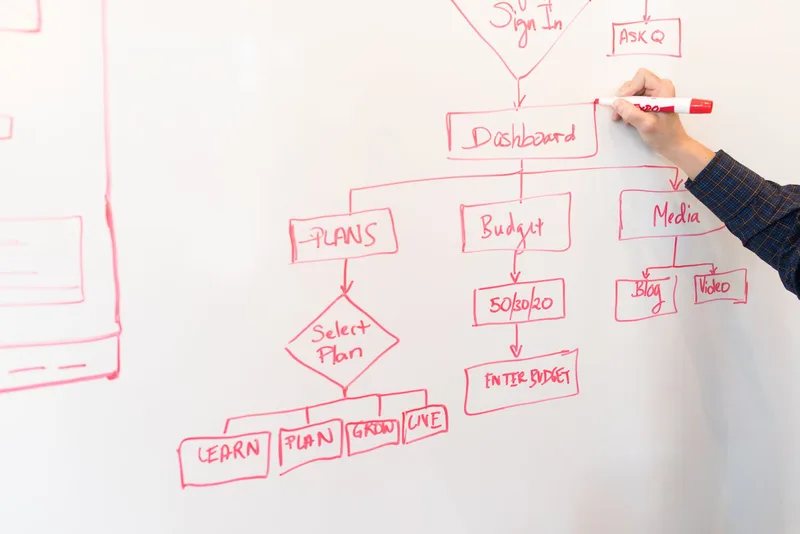
The honest tradeoff: Teachable assumes the lead capture problem is already solved. For creators who have an audience and are launching their first paid product to that audience, this is rarely a blocker. For creators trying to grow a list from scratch, it is the first tool you add alongside Teachable, not instead of it.
How Does Teachable Handle Email and Nurture Sequences?
Teachable’s email tools are limited to drip content schedules and automated follow-up for people who have already started checkout, per teachable.com/features. It natively integrates with ConvertKit and MailChimp; other tools connect through Zapier. There is no list-building or pre-sale nurture sequence feature built in.
Teachable’s native email capability covers two things well: drip-releasing course content to enrolled students, and re-engaging someone who started checkout but did not finish.
What it does not cover is the nurture sequence that happens before someone buys anything: the welcome email after a lead magnet, the 3 to 5 emails that build trust and address objections, the launch sequence that creates urgency around a cart-close date. Those are marketing automation functions, and Teachable does not position itself as a marketing automation tool.
The ConvertKit and MailChimp integrations mean enrollment and purchase events can trigger tags in your email tool, so your nurture sequences can react to what someone does on Teachable. But the sequences themselves live outside the platform.
Still deciding on the right email tool to pair with Teachable? The ConvertKit vs MailerLite comparison breaks down which one fits a solo creator’s list size and budget.
The honest tradeoff: if your email marketing already runs through ConvertKit, MailChimp, or a Zapier-connected tool, this gap is invisible to you day to day. If you are picking your first email tool at the same time you are picking Teachable, budget for both from the start. Treating Teachable as a complete marketing stack is the single most common mistake solo creators make with this platform.
Is Teachable’s Course and Sales Page Builder Good Enough to Sell With?
Teachable’s course builder supports video, text, audio, PDF, and quiz content with drip scheduling and prerequisites, and its sales page editor allows direct HTML block editing on paid plans, per teachable.com/features. The interface prioritizes speed of setup over deep customization, which makes it faster to publish than some competitors but less flexible for a highly designed sales page.
The course builder itself is one of Teachable’s clearer strengths. Sections and lectures are easy to organize, uploads are straightforward, and the student view is clean without extra configuration. Quizzes support standard multiple-choice format. Certificates are available on the Growth plan.
The sales page is where offer clarity gets decided, and Teachable gives you more room here than most competitors in its price range. If you know basic HTML, you can edit content blocks directly rather than being locked into a fixed template. If you do not, the default templates are serviceable but not distinctive.
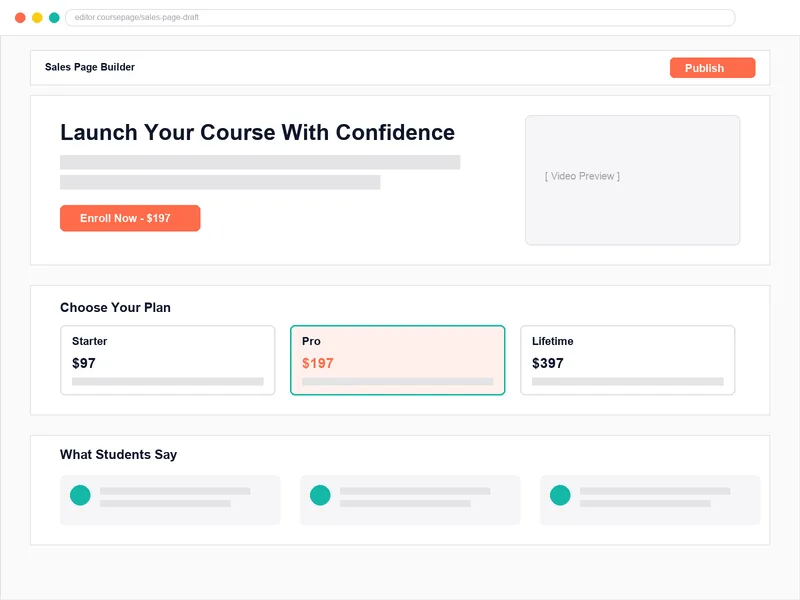
The honest tradeoff: Teachable will not fight you on course structure, and it gives you more sales page flexibility than a pure course-delivery tool like Thinkific. It will also not hand you a conversion-optimized template the way Kajabi’s more polished (and more expensive) builder does. For a solo creator who wants to publish quickly and iterate based on what sells, that tradeoff favors speed over polish, which is usually the right call before you have validated demand.
How Much Friction Is There at Checkout, and What Do the Fees Actually Cost?
Teachable charges a 7.5% transaction fee on the Starter plan ($39/month) and 0% on Builder ($89/month), Growth ($189/month), and Custom plans when using Teachable Payments, per teachable.com/pricing. Order bumps are available on Builder and above, and Teachable reports that order bumps raise average order value by $30 per sale, per its own product documentation.
Checkout is where Teachable earns its reputation as a sales-first platform, relative to pure course-hosting competitors.
Upsells, order bumps, and abandoned cart recovery are built into the paid plans. A student who adds a course to cart but does not finish checkout can be automatically re-engaged. A one-click order bump can add a companion product at the moment of purchase without re-entering payment details.
The fee structure is the number that actually changes your math. On the Starter plan, the 7.5% transaction fee applies on top of standard payment processing. Sell a $197 course to 10 students in a month on Starter, and the platform fee alone comes to roughly $147.75, separate from the $39 monthly subscription. That is more than three times the subscription cost in fees before you even look at processor rates.
The breakeven is straightforward: once monthly course sales pass roughly $667, the Builder plan’s flat $89 with 0% transaction fee costs less than Starter’s $39 plus 7.5%. Annual billing drops the Builder plan to about $69 per month per Teachable’s pricing page, which saves 22% compared to monthly billing and shifts that breakeven down to roughly $533.
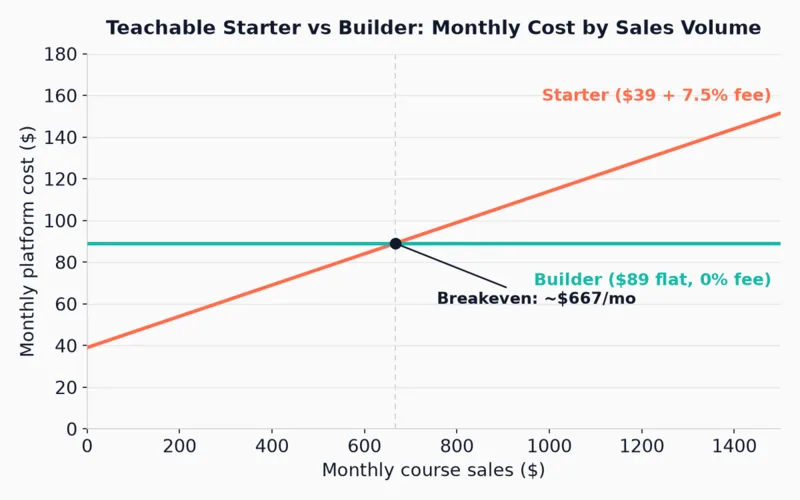
The honest tradeoff: Starter makes sense only while you are validating that a course sells at all, at low volume. The moment sales become consistent, the transaction fee becomes the more expensive option, and the math says move to Builder.
What Happens After Someone Buys? Does Teachable Help With Retention and Upsells?
Teachable includes an affiliate program on Builder and above, iOS and Android student apps on every plan, and course certificates on the Growth plan, per teachable.com/pricing. Post-purchase email sequences still require a connected email tool, since Teachable’s native email features apply to enrolled-student drip content, not ongoing nurture or re-engagement campaigns.
Post-purchase follow-up is the funnel stage most solo creators skip entirely, and it is also where Teachable’s native tools taper off the fastest.
What Teachable handles on its own: drip-releasing modules over time so students do not binge and vanish, a mobile app so students can watch on the go, and (on Builder and above) a built-in affiliate program so other people can promote your course for a commission without a third-party affiliate tool.
What it does not handle: the onboarding email after purchase, the check-in at day seven to see if the student started the course, the win-back sequence for someone who bought but has not logged in. Those depend on your connected email tool firing off Teachable’s enrollment webhook.
Teachable also lists automatic sales tax and VAT collection on international sales as a built-in feature, which matters if you are selling to students outside the US and would otherwise need a separate tax compliance tool.
The honest tradeoff: the affiliate program is a genuine funnel advantage that most competitors in this price range do not offer natively. The post-purchase email gap is not unique to Teachable (most course platforms share it), but it means the platform alone will not retain a student who buys and goes quiet.
What Does Teachable Cost at Each Plan Tier?
Teachable’s three paid plans run $39, $89, and $189 per month on monthly billing (roughly $29, $69, and $139 on annual billing), per teachable.com/pricing. Starter allows 5 products with a 7.5% transaction fee; Builder allows 10 products with 0% fees and an affiliate program; Growth allows 50 products with certificates and custom admin permissions.
| Plan | Price (monthly / annual) | Best for | Key limit |
|---|---|---|---|
| Starter | $39/mo ($29/mo billed annually) | Testing whether a first course sells | 7.5% transaction fee; 5 products |
| Builder | $89/mo ($69/mo billed annually) | Steady course sales with a small catalog | 10 products; 0% transaction fee; affiliate program unlocks here |
| Growth | $189/mo ($139/mo billed annually) | A larger catalog sold under your own brand | 50 products; certificates; no Teachable branding |
Prices per teachable.com/pricing, checked October 2026. Teachable lists a 7-day free trial and a 30-day money-back guarantee on every plan. Pricing changes periodically; verify current rates before committing. A published product counts as one toward the plan limit regardless of how many lessons it contains, per Teachable’s pricing FAQ, and memberships or bundles do not count toward that limit.
Not sure which plan fits your situation, or whether Teachable is even the right starting platform? The Solo Funnel Blueprint walks through your funnel stage by stage and tells you what to check before you commit to a monthly subscription.
Who Should Use Teachable (and Who Should Skip It)?
Teachable is the right choice for solo creators who already have an audience, have validated course demand, and want fast course setup with built-in upsells and an affiliate program. It is the wrong choice for creators who still need to build lead capture, email nurture, or a landing page, since none of those are included on any plan.
Here is the diagnostic view, stage by stage:
| Funnel stage | Teachable’s coverage | Limitation |
|---|---|---|
| Lead capture | None built in | No landing page or opt-in tool on any plan |
| Email delivery | Enrolled-student drip content; ConvertKit/MailChimp native integration | No pre-sale nurture or marketing automation |
| Offer clarity | Fast course builder; HTML-editable sales page on paid plans | Default templates are plain without manual editing |
| Checkout friction | Upsells, order bumps, abandoned cart recovery on paid plans | 7.5% fee on Starter; 0% requires upgrading to Builder |
| Post-purchase | Affiliate program (Builder+), drip content, mobile app, tax handling | Email retention sequences need an external tool |
Use Teachable if:
- You already have an audience and a validated offer, and you need somewhere fast to host and sell the course
- You want built-in upsells, cart recovery, and an affiliate program without adding a separate checkout tool
- You sell internationally and want tax and VAT collection handled for you
- Your email marketing and lead capture are already set up elsewhere
Skip Teachable (or pair it carefully) if:
- You have no email list yet and need a platform that builds one for you: look at Kajabi or Systeme.io instead
- You are testing demand at low volume and the 7.5% Starter fee will eat into thin margins faster than a flat monthly cost would
- You want one login managing the whole funnel rather than stitching tools together
The clearest signal Teachable is the wrong fit right now: if you do not yet know whether people will buy your course, the platform is not your biggest risk. The offer and the audience are. Validate those first with the smallest setup you can manage, then pick the platform that matches the funnel you actually have.
Frequently Asked Questions
Is Teachable worth it in 2026?
Teachable is worth it for solo creators who already have an audience and a validated course idea, and who want fast setup with built-in upsells and an affiliate program. At $39 to $189 per month depending on plan, per teachable.com/pricing, it is a mid-range option. It is a weaker fit for creators who still need lead capture and email marketing tools, since neither is included on any plan.
Does Teachable have a free plan?
No. Teachable removed its free plan in 2020. It offers a 7-day free trial and a 30-day money-back guarantee on paid plans, per teachable.com/pricing, which lets you explore the platform before committing to a subscription.
How much does Teachable take in fees?
Teachable charges a 7.5% transaction fee on the Starter plan ($39/month) on top of standard payment processing fees. The Builder ($89/month), Growth ($189/month), and Custom plans charge 0% transaction fees when using Teachable Payments, per teachable.com/pricing. At roughly $667 or more in monthly course sales, Builder’s flat fee becomes cheaper than Starter’s percentage-based fee.
Can Teachable replace my email marketing tool?
No. Teachable’s native email capability covers drip content for enrolled students and abandoned-cart follow-up only. It integrates natively with ConvertKit and MailChimp and connects to other tools through Zapier, but pre-sale nurture sequences and list-building features are not part of any Teachable plan. See the ConvertKit vs MailerLite comparison for a standalone email tool to pair with it.
How is Teachable different from Kajabi?
Teachable focuses on course delivery and checkout and costs less at every tier, starting at $39/month against Kajabi’s $179/month. Kajabi bundles email marketing, landing pages, and funnel automation into every plan. The Kajabi vs Teachable comparison runs the full fee math and feature breakdown between the two.
Keep Reading
What to Do Next
Choose the path that fits where you are right now.
Get the Free Solo Funnel Diagnostic
Get the free Solo Funnel Diagnostic. 12 diagnostic questions. Scored in 10 minutes. Tells you exactly which stage is broken and what to fix first.
Send Me the Diagnostic