In this article
Pick the wrong email tool and you pay twice.
Once for the plan. Again when you migrate. Mailchimp and ConvertKit both send email to a list, but they are priced and built for different people. This post checks each against what a solo creator needs: a signup page, a welcome sequence and a way to get paid.
ConvertKit is now called Kit. This post uses “ConvertKit” and “Kit” for the same product, per the “Formerly ConvertKit” label on kit.com.
Mailchimp vs ConvertKit: How Do They Compare for Solo Creators?
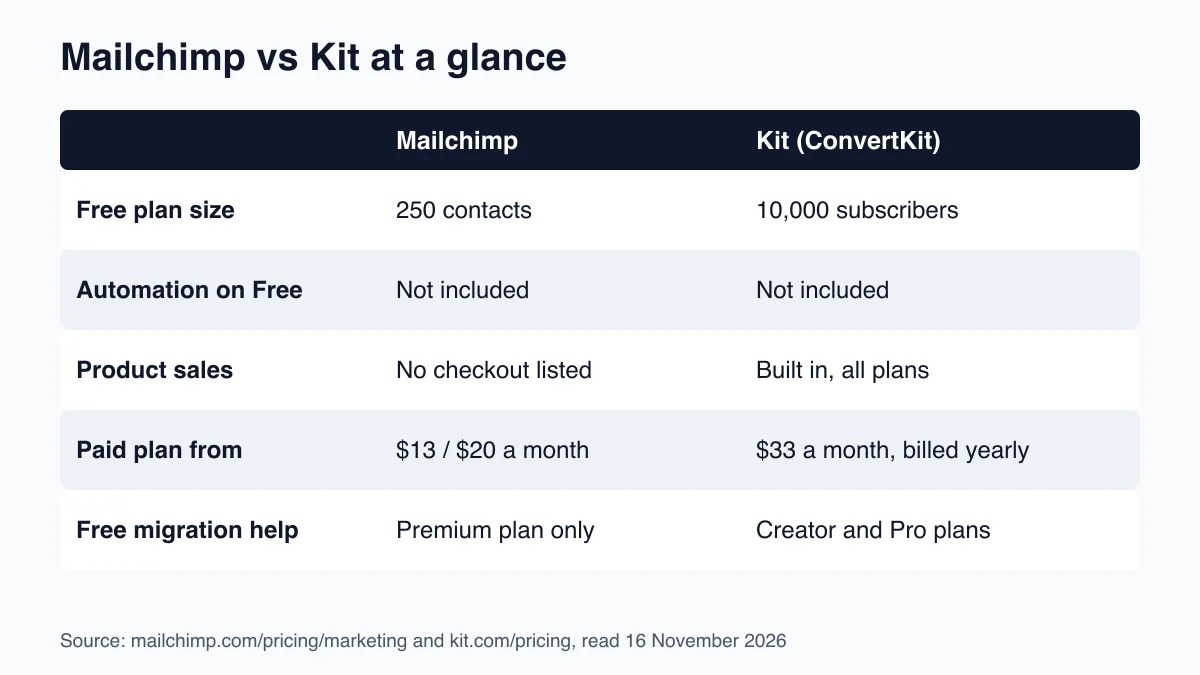
Kit (formerly ConvertKit) is an email platform built for creators that bundles landing pages, automations and product sales. Per kit.com/pricing, its Free plan covers up to 10,000 subscribers. Mailchimp’s Free plan stops at 250 contacts, so Kit gives a growing list far more room before you pay.
Mailchimp is the older, broader tool. It serves shops, agencies and small businesses as well as creators. Kit was built for people who sell what they make.
That difference shows up in the plans. Here is the side-by-side, then the detail behind each row.
| Tool | Price | Key feature | Best for |
|---|---|---|---|
| Mailchimp Free | $0, up to 250 contacts | Email campaigns, 500 sends a month | Testing the tool with a tiny list |
| Mailchimp Essentials / Standard | From $13 / $20 a month | Standard adds up to 200 automation flows | Creators who want one broad marketing tool |
| Kit Free | $0, up to 10,000 subscribers | Unlimited landing pages and forms, sell products | Starting a list with no budget |
| Kit Creator | $33 a month billed yearly, for 1,000 subscribers | Unlimited visual automations and sequences | Creators who automate and sell |
Sources: mailchimp.com/pricing/marketing and kit.com/pricing, read on 16 November 2026. Mailchimp prices depend on contact count, so the starting figures above are for the smallest bracket.
The table gives the shape. Now the parts that decide it.
What Does Each Free Plan Actually Give You?
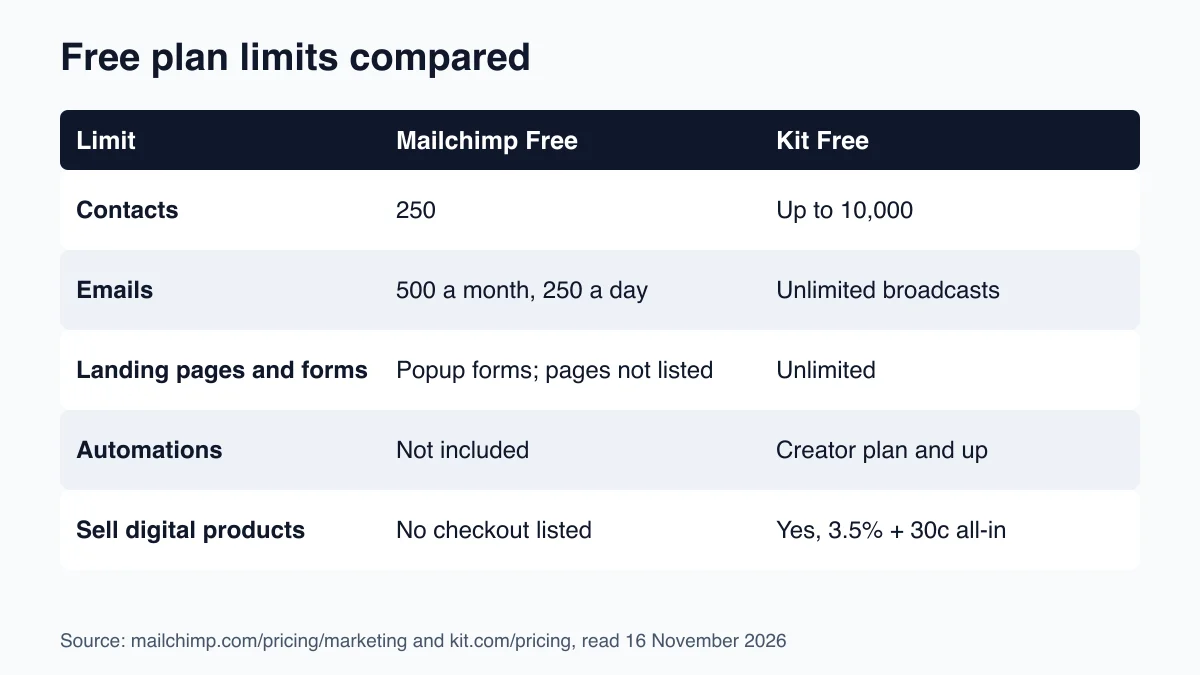
Kit’s Free plan covers up to 10,000 subscribers with unlimited landing pages, forms and broadcasts. Mailchimp’s Free plan is capped at 250 contacts and 500 emails a month, per mailchimp.com. A creator with a growing list outgrows Mailchimp Free fast and Kit Free much later.
A free plan is where you learn whether the tool fits. So what each one blocks matters as much as what it includes.
Mailchimp Free is a trial in practice. One seat, one audience, a limit of 500 emails a month or 250 a day, and no scheduled sends. Automation flows are listed as not included. You can build a list and send a plain campaign. That is about it.
Kit Free is a working starter plan. You can publish landing pages, collect signups, send broadcasts and even sell digital products. What it holds back is the automation engine. Visual automations and automated email sequences are Creator-plan features, per Kit’s feature table.
So Kit Free lets you grow to 10,000 people before it asks for money. But it will not run a welcome sequence for you. You send those emails by hand until you upgrade.
Which Tool Gives You Automation Without Overpaying?
Mailchimp’s paid plans include automation flows: Essentials allows up to 4 flow steps and Standard up to 200 flows, per mailchimp.com. Kit puts unlimited visual automations and sequences on its Creator plan from $33 a month billed yearly. Both work once you pay, and Mailchimp starts cheaper.
Automation is the part that turns a list into a funnel. A subscriber joins, gets email one right away, email two on day three, and a pitch on day seven. Nobody on your side presses a button.
Start with Mailchimp. The cheapest paid plan, Essentials, caps flows at four steps. That is enough for a short welcome series but tight for a launch sequence with branches. Standard lifts the cap to 200 flows and adds more send volume. Its monthly send limit is 12 times your contacts, per the same page.
Kit’s Creator plan has no automation cap. The builder is visual: you drag a trigger, add waits and email steps, and split paths by what a subscriber clicks. Creator also adds unlimited email sequences and free migration help from Kit’s team, per kit.com.
For a solo creator, the practical question is how complex your funnel is. A single welcome sequence and one lead magnet fits Mailchimp Essentials. A lead magnet, a nurture series, a launch and a post-purchase flow fits Kit. If you want to see where yours leaks first, the funnel diagnostic walks through the five stages.
Can You Sell a Product From Inside the Email Tool?
Kit can sell digital products and subscriptions on every plan, including Free. Per kit.com, it takes 0.6% plus card processing fees. Mailchimp’s plan comparison lists no product checkout, so you connect a separate tool such as Stripe or Shopify to take payment.
This is the clearest gap between the two.
Kit Commerce lets you upload an ebook, template pack or paid newsletter, set a price and add a buy button to an email or landing page. Kit delivers the file, tags the buyer and can keep that buyer out of promotional emails. Kit’s pricing page lists the all-in fee as 3.5% plus 30 cents per sale, so budget for that figure, not only the 0.6%.
Mailchimp is different. Its pricing page lists no digital product checkout in the plan comparison I read. It does list integrations with Stripe, Shopify and WooCommerce. So you can sell, but through a second account and a connection you maintain.
Neither approach is wrong. If you already sell through a storefront, the extra connection costs you little. If you do not yet sell anything, one tool is one less thing to break.
Not sure where your funnel actually leaks? The funnel diagnostic ranks the five stages in about ten minutes. Free. No pitch.
The weaker spot for Kit is cost once you leave the free plan. Which brings up the price question.
How Much Will Each Cost as Your List Grows?
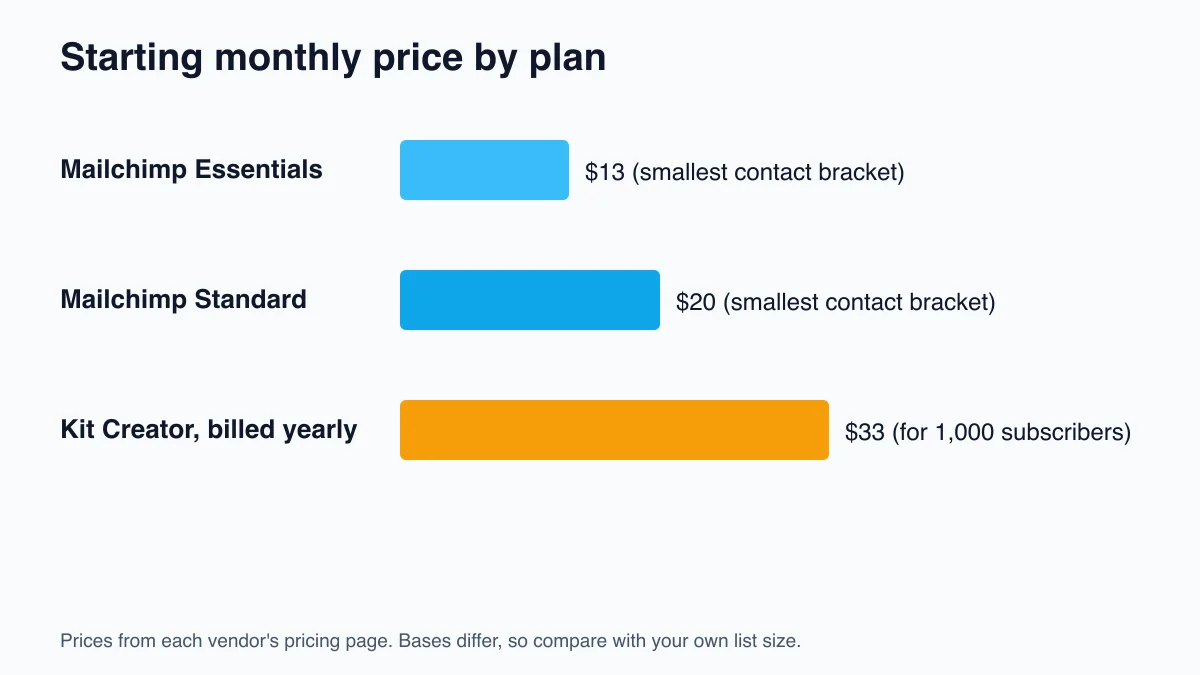
Mailchimp starts at $13 a month on Essentials and $20 on Standard, rising with contact count, per mailchimp.com. Kit Creator is $33 a month billed yearly for 1,000 subscribers. Mailchimp is cheaper to start. Kit is cheaper to leave free, up to 10,000 subscribers.
Do not compare these numbers one to one. The bases differ.
Mailchimp’s starting prices are for its smallest contact bracket, and the price climbs through brackets up to 1,000,000 contacts. The Premium plan starts at $350 a month. For 10,000 or more contacts Mailchimp advertises 15% off the first 12 months. I could not read the exact price at 1,000 contacts, because it loads from a slider. Check the slider with your own list size before you decide.
Kit’s Creator plan is $33 a month when billed yearly. That is $390 a year, which Kit says saves $78 versus paying monthly. So the monthly price works out to $39. Kit’s Pro plan is $66 a month on yearly billing, for creators who want deliverability reporting and unlimited users.
Here is the cost logic. If your list is under 250, Mailchimp Free costs nothing. From 250 to 10,000 subscribers, Kit Free costs nothing but gives no automation. Once you need automation, Mailchimp Essentials or Standard is the cheaper entry, and Kit Creator is the one with more room.
Prices change. Treat the pages linked above as the source of truth on the day you buy.
Which Email Tool Should a Solo Creator Choose?
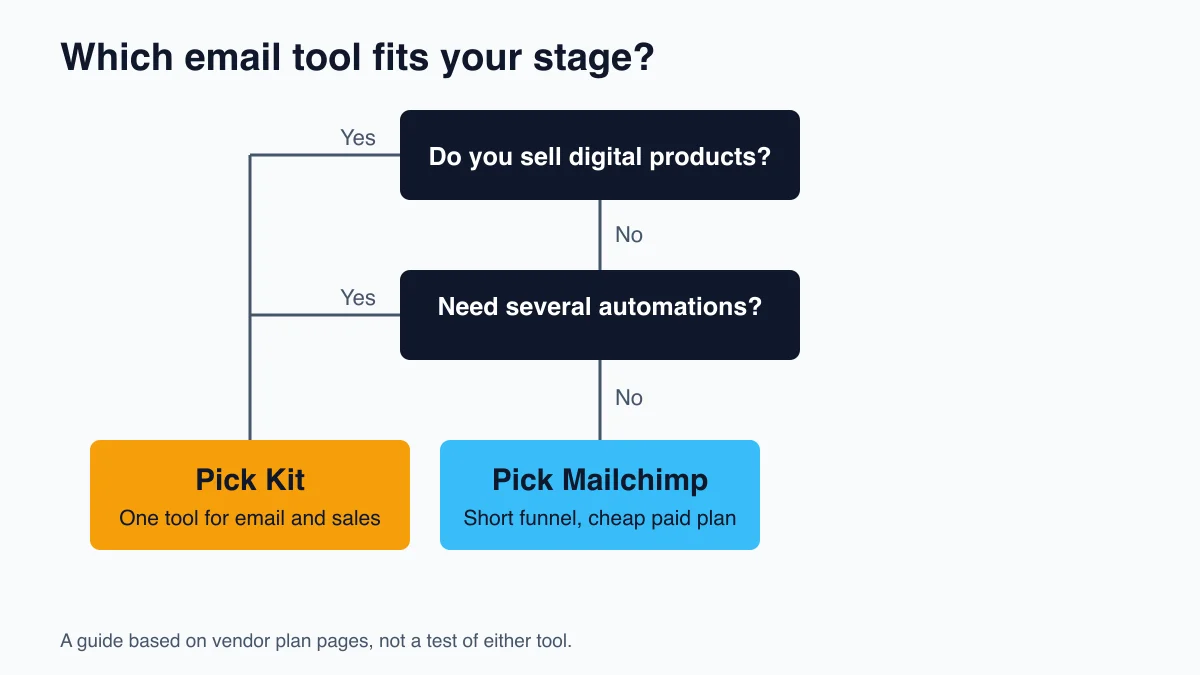
Choose Kit if you will sell digital products or run several automations and want one tool for both. Choose Mailchimp if you already have a storefront, need a low-cost paid plan, and keep your funnel simple. If you have no budget and a growing list, Kit’s free plan lasts longest.
Pick Kit (ConvertKit) if:
- You plan to sell an ebook, template or paid newsletter in the next six months
- You want landing page, email and checkout in one account
- You expect a welcome, nurture and launch sequence, not just one
- Your list will pass 250 contacts before you can pay for a plan
Pick Mailchimp if:
- You sell through Shopify, WooCommerce or Stripe already
- You want the cheapest paid automation and your funnel is short
- You want 24/7 email and chat support on a paid plan, which both Standard and Essentials list
- You need phone support or testing tools that come with higher tiers
One honest warning. Both tools are fine at sending email. The leak is rarely the tool. If nobody opens your emails, switching from Mailchimp to Kit will not fix it. Start with how to improve email open rate before you migrate.
If you pick Kit and later want to compare it with other tools, ConvertKit alternatives lists what creators move to. Weighing Kit against a cheaper rival? The ConvertKit vs MailerLite comparison covers it.
Frequently Asked Questions
Is Mailchimp or ConvertKit better for creators?
ConvertKit (Kit) suits most solo creators. Its Free plan covers up to 10,000 subscribers and includes landing pages and product sales, per kit.com/pricing. Mailchimp’s Free plan stops at 250 contacts. Mailchimp wins when you already run a storefront and want a cheap paid plan with a short automation flow.
Is ConvertKit the same as Kit?
Yes. Kit is the new name for ConvertKit, and kit.com carries the label “Formerly ConvertKit.” Plans, features and the Free plan described in this post apply to the product under its current name. Older reviews that say ConvertKit describe the same tool, though their prices may be out of date.
How much does Mailchimp cost compared to ConvertKit?
Mailchimp starts at $13 a month on Essentials and $20 on Standard, rising with contact count. Kit Creator is $33 a month billed yearly for 1,000 subscribers. Mailchimp’s smallest paid plan is cheaper, but its price changes by contact bracket, so check the slider with your own list size.
Can I switch from Mailchimp to ConvertKit?
Yes. Kit says it offers free migration from another platform on its Creator and Pro plans, with an in-house team that rebuilds forms, templates and automations. Kit’s Free plan does not include migration help. Export your list first, then plan your welcome sequence before you move anything.
Keep Reading
What to Do Next
Choose the path that fits where you are right now.
Get the Free Solo Funnel Diagnostic
Get the free Solo Funnel Diagnostic. 12 diagnostic questions. Scored in 10 minutes. Tells you exactly which stage is broken and what to fix first.
Send Me the DiagnosticRelated Articles
ConvertKit vs MailerLite: Email Tool for Solo Creators?
ConvertKit vs MailerLite for solo creators: pricing, automation, deliverability, and built-in commerce compared. Which tool fits your stage.
ConvertKit vs Mailerlite: Email Tool Comparison for Solo Creators
ConvertKit vs Mailerlite for solo creators, evaluated against the 5 places creator funnels leak. Honest tradeoffs on pricing, automation, and deliverability. Who each one is actually for.
Beehiiv vs Substack: Which Newsletter Platform for Paid Subscribers?
Beehiiv vs Substack for a paid newsletter, evaluated against the five places a creator funnel leaks. Honest tradeoffs, no hype, who each one is actually for.