In this article
Kajabi and Teachable both sell courses. That is where the overlap ends.
Kajabi bundles email, landing pages, and funnels into one plan. Teachable focuses on course delivery and checkout, and leaves most of the funnel to other tools. The price gap follows that split. The real question is how many tools you want to run yourself.

This comparison runs both platforms through the five places a creator funnel leaks: lead capture, email, offer clarity, checkout, and post-purchase follow-up. Prices come from each platform’s own pricing page, checked in September 2026.
What Is the Core Difference Between Kajabi and Teachable?
Kajabi is an all-in-one platform for courses, email marketing, landing pages, funnels, and communities, priced at $179, $249, or $499 per month on monthly billing, per kajabi.com/pricing. Teachable is a course-first platform priced at $39, $89, or $189 per month, per teachable.com/pricing. Its plans cover course delivery and checkout, and list no email marketing or funnel builder.
Think of it as one tool versus a stack.
Kajabi’s pricing page lists funnels, websites, landing pages, marketing emails, communities, and advanced automations. Teachable’s plan lists cover products, student apps, global payments and taxes, upsells and cart recovery, and on higher plans an affiliate program and course certificates. There is no landing page builder or email tool on that list.
That does not make Teachable a weak product. It makes it a narrower one. A creator who already has an email tool and a landing page they like does not need Kajabi’s bundle, and paying for it means paying twice.
For a solo creator, the decision is about upkeep. Every extra tool is another login, another integration, another invoice. Kajabi’s own pricing FAQ argues that pricing the pieces separately makes Kajabi the cheaper option. That is a claim from the seller, so the sections below test it against the published numbers.
How Do Kajabi and Teachable Compare Side by Side?
Teachable is cheaper at every tier, starting at $39 per month against Kajabi’s $179. Kajabi costs more but bundles email, landing pages, funnels, and a contact list into the price. On product limits, Teachable’s $89 Builder plan allows 10 products, while Kajabi’s $179 Basic plan allows 5.
| Tool | Price | Key feature | Best for |
|---|---|---|---|
| Kajabi Basic | $179/mo ($143/mo billed annually) | 5 products, 2,500 contacts, email, landing pages, and funnels included | One core offer plus list building in one account |
| Kajabi Growth | $249/mo ($199/mo billed annually) | 50 products, 25,000 contacts, 3 communities, 11 admin users | A growing list and a helper or two |
| Kajabi Pro | $499/mo ($399/mo billed annually) | Unlimited products, 100,000 contacts, Access Groups, 26 admin users | Multiple brands or a small team |
| Teachable Starter | $39/mo ($29/mo billed annually) | 5 products, upsells and cart recovery, 7.5% transaction fee | Testing a first course on a small budget |
| Teachable Builder | $89/mo ($69/mo billed annually) | 10 products, 0% transaction fee, affiliate program | Steady course sales and a small catalog |
| Teachable Growth | $189/mo ($139/mo billed annually) | 50 products, course certificates, custom admin permissions, no Teachable branding | A larger catalog under your own brand |
Prices per kajabi.com/pricing and teachable.com/pricing, checked September 2026. Both change periodically. Kajabi lists a free trial and a 30-day money-back guarantee on every plan. Teachable lists a 7-day free trial and a 30-day money-back guarantee.
Which Platform Handles Lead Capture and Email Better?
Kajabi handles both inside the platform. Its pricing page lists landing pages, funnels, and marketing emails across all three plans. Teachable’s plan lists include neither, so you add a landing page tool and an email tool, then connect them to Teachable.
Lead capture is the first leak: a visitor likes your post and leaves without giving an email address. The fix is an opt-in page, and the two platforms handle it very differently.
Kajabi: Landing pages and funnel templates are on every plan, so a new subscriber lands in the same system that holds your courses. You can tag them and start a sequence without an integration in between. The limit is contact count: 2,500 on Basic, 25,000 on Growth, and 100,000 on Pro. Extra contacts come in blocks of 25,000 for $125 per month, per Kajabi’s pricing FAQ.
Teachable: It hosts the course and takes the payment. Landing pages and email marketing are not listed on its plans, so the opt-in page lives in one tool, the email list in another, and the course in a third. Each connection is a place where subscribers can quietly stop flowing.
Teachable’s features page does mention drip content and automatic re-engagement of prospects who abandon a purchase. Those cover people who reached checkout or enrolled. A welcome sequence for subscribers who have not bought yet still needs an email tool. If you go this route, the ConvertKit vs MailerLite comparison covers the email side.
The honest tradeoff on Kajabi’s side: its email tool is one part of a package. If email is your main revenue channel, compare it against a dedicated tool before you commit.
Not sure which stage is leaking? The funnel diagnostics hub walks through the checks to run before you pay for a bigger platform.
Which Platform Makes the Offer Easier to Present?
Kajabi’s product menu covers courses, coaching, communities, memberships, digital downloads, newsletters, and podcasts. Teachable’s homepage covers courses, coaching, digital downloads, and memberships. Product limits differ: Kajabi allows 5, 50, or unlimited across its tiers, and Teachable allows 5, 10, or 50.
Offer clarity is about whether your sales page, price, and checkout tell one consistent story. Both platforms give you a sales page and a checkout. The difference is how much else surrounds them.
On Kajabi, the sales page, the email sequence that warms people up, and the community that follows the purchase all live in one account. That makes it easier to keep one story, and easier to over-build. One offer with a clear promise beats a five-product catalog with a fuzzy one.

On Teachable, the course sits at the center. A published course, coaching offering, or digital download counts as one product no matter how many lessons it holds, and memberships and bundles do not count toward the limit, per Teachable’s pricing FAQ. A course with 30 videos and 5 quizzes is still 1 product. That makes the 10-product Builder plan more generous than it first looks.
The product math favors Teachable at the low end. Kajabi Basic allows 5 products at $179 per month. Teachable Builder allows 10 at $89 per month. If you sell a library of small products, such as templates, mini-courses, and workshops, Teachable gives you the room for less money. You supply the pages that sell them.
If nobody understands what you sell, neither platform fixes that. It is an offer problem, and a bigger plan will not solve it. The Kajabi review runs Kajabi through all five leaks if you want the longer read.
How Do Checkout and Transaction Fees Compare?
Per Teachable’s pricing page, it charges a 7.5% transaction fee on Starter and 0% on Builder, Growth, and Custom when you use its own payment options. Per Kajabi’s pricing page, Kajabi takes no revenue share but charges a Kajabi Payments rate of 2.9% + $0.30 on Basic, 2.8% + $0.30 on Growth, and 2.7% + $0.30 on Pro for US entities.

These are not the same kind of fee. Teachable’s 7.5% is a platform fee, and Teachable notes that standard processing fees may still apply on top. Kajabi’s rate is the card-processing fee itself, with no revenue share added. If you use a third-party payment provider instead of Kajabi Payments, Kajabi adds its own fee: 2% on Basic, 1% on Growth, and 0.5% on Pro, with PayPal excluded.
Here is the arithmetic on the published monthly prices:
- Teachable Starter costs $39 plus 7.5% of your sales. At $2,000 in course sales, that is $39 plus $150, or $189.
- Teachable Builder costs $89 flat, with no platform fee.
- Kajabi Basic costs $179 flat, with no revenue share.
Starter only beats Builder while your monthly sales stay under about $667. Once sales pass about $1,867 a month, Starter costs more than Kajabi Basic, which also bundles email and landing pages.
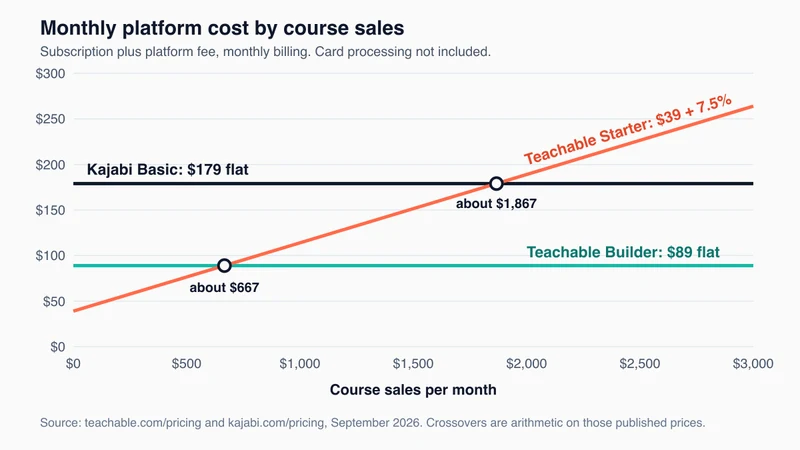
Card processing is left out of the chart, so compare it line by line on each platform before you commit.
Checkout tools are closer than the fees. Teachable lists upsells and cart recovery on every plan, and says order bumps raise order values by an average of $30. That figure comes from Teachable itself. Kajabi’s homepage lists upsells, downsells, order bumps, subscriptions, and payment plans. The friction gap at checkout is small. The fee model is the real difference.
What Happens After the Sale on Each Platform?
Both platforms give students an app and post-purchase tools. Kajabi adds automations and communities (1 on Basic, 3 on Growth, Access Groups on Pro). Teachable adds course certificates on its Growth plan and says it handles sales tax and VAT collection. The gap is follow-up: Kajabi can email buyers from the same account, while Teachable needs your email tool.
Post-purchase follow-up is the leak most solo creators never look at. A buyer checks out, gets no onboarding email, never opens the course, and never sees the next offer.
Kajabi keeps that follow-up in one place. Automations trigger from purchases, and communities give buyers somewhere to land. Its FAQ points to the Pro plan for creators who want their own app in the App Store.
Teachable lists iOS and Android student apps on every plan. The follow-up email itself still runs through your email tool, wired to Teachable through an integration. Certificates are a Growth plan feature at $189 per month.
Tax is the other difference for international buyers. Teachable says it automatically collects and remits sales tax and VAT. Kajabi’s homepage lists automated tax calculation. Check whether you still file the tax yourself before you sell abroad at volume.
Which Platform Is Right for Your Creator Funnel?
Choose Kajabi if you want email, landing pages, and courses in one account and your offer has already sold. Choose Teachable if your email and landing pages are handled elsewhere and you mainly need course hosting and checkout at a lower monthly cost. If you have not sold your first course yet, start lighter than either.
Choose Kajabi if:
- You want lead capture, email, checkout, and courses under one login
- You are tired of reconnecting an email tool, a landing page tool, and a course platform every time one breaks
- You already have paying customers and can add up what the separate tools would cost you
Choose Teachable if:
- You already have an email tool and a landing page setup you trust
- You sell many small products, and the 10-product Builder plan at $89 per month fits
- You sell to international buyers and want the platform to handle tax collection
- You want an affiliate program without stepping up to Kajabi pricing
Start with neither if:
- You have not validated your offer. Kajabi’s own FAQ says Basic is the right plan if you have not sold anything yet, but $179 per month is a lot to commit before an offer has proved itself. The Teachable alternatives roundup and the Kajabi competitors breakdown cover cheaper places to test.
- Your traffic comes from a bio link and you sell one simple product. The Stan Store vs Kajabi comparison fits that shape better.
Your funnel is not broken because you picked the wrong platform. It is broken because you do not know which step is losing people. Find that step first, then buy the tool that fixes it. If Teachable is close but not right, the Teachable vs Thinkific comparison covers the other major course-only option.
Frequently Asked Questions
Is Kajabi worth the extra cost over Teachable?
It depends on what you would otherwise buy. Kajabi Basic at $179 per month sits $90 above Teachable Builder at $89. If an email tool and a landing page tool would cost you more than that gap, Kajabi costs less overall. If you already run those tools cheaply or for free, Teachable costs less. Price your own stack before deciding.
Do Kajabi and Teachable charge transaction fees?
Teachable charges 7.5% on Starter and 0% on Builder, Growth, and Custom when you use its payment options, per its pricing page. Kajabi says it takes no revenue share, but Kajabi Payments carries a card-processing rate of 2.9% + $0.30 on Basic, falling to 2.7% + $0.30 on Pro, for US entities.
Do I still need a separate email tool with Kajabi or Teachable?
With Teachable, yes for list building and welcome sequences, since email marketing is not listed on its plans. With Kajabi, no for most solo creators, because marketing emails and automations are included on every plan. If email is your main revenue channel, compare Kajabi’s email against a dedicated tool first.
Which is better for a beginner with no audience?
Neither is the lowest-cost place to start. Teachable Starter at $39 per month is the cheaper of the two, and it lists a 7-day free trial and a 30-day money-back guarantee. Kajabi also lists a 30-day money-back guarantee. Validate the offer first, then move to the platform that matches your funnel.
Can I switch between Kajabi and Teachable later?
Yes, but expect rebuild work. Teachable’s Growth plan lists imported students, and its Custom plan lists migration assistance, per its pricing page. Beyond that, plan to rebuild sales pages, reconnect integrations, and re-upload anything the export does not carry. Check each platform’s help documentation for what moves across before you start.
Keep Reading
What to Do Next
Choose the path that fits where you are right now.
Get the Free Solo Funnel Diagnostic
Get the free Solo Funnel Diagnostic. 12 diagnostic questions. Scored in 10 minutes. Tells you exactly which stage is broken and what to fix first.
Send Me the Diagnostic