In this article
Kajabi replaces a pile of tools with one bill.
That is the pitch. It is also an expensive way to find out your funnel was leaking somewhere software cannot fix.
This review scores Kajabi against the five places a creator funnel leaks, then says who should buy it and who should skip it.

What Is Kajabi, and Who Is It Actually For?
Kajabi is an all-in-one platform that bundles course hosting, a website builder, email marketing, funnel templates, checkout, and community into one subscription. Plans run $179, $249, and $499 per month on monthly billing, per kajabi.com/pricing, with a 14-day free trial and no revenue share on sales.
Kajabi is built to replace the stack a solo creator otherwise assembles: a course host, a page builder, an email service, a checkout, and a community space. Its own email marketing page says it replaces tools such as Kit (formerly ConvertKit), Mailchimp, and GoHighLevel.
The products it lists are courses, memberships, coaching, communities, newsletters, digital downloads, and podcasts. Physical products are not on that list, so merchandise would need a separate store.
Most of the gap between plans is volume, not capability. Products, contacts, admin seats, and communities scale with price. A few features, including advanced automations and affiliate programs, are reported to begin at Growth, per LitExtension’s Kajabi review. Check the feature grid on the pricing page before you assume Basic includes them.
That gives us the diagnostic frame for this review. Kajabi’s value is fewer hand-offs between the steps of a funnel. Every hand-off between two tools is a place where a lead or a sale can slip out. Kajabi does not fix a weak offer or an audience that is not there.
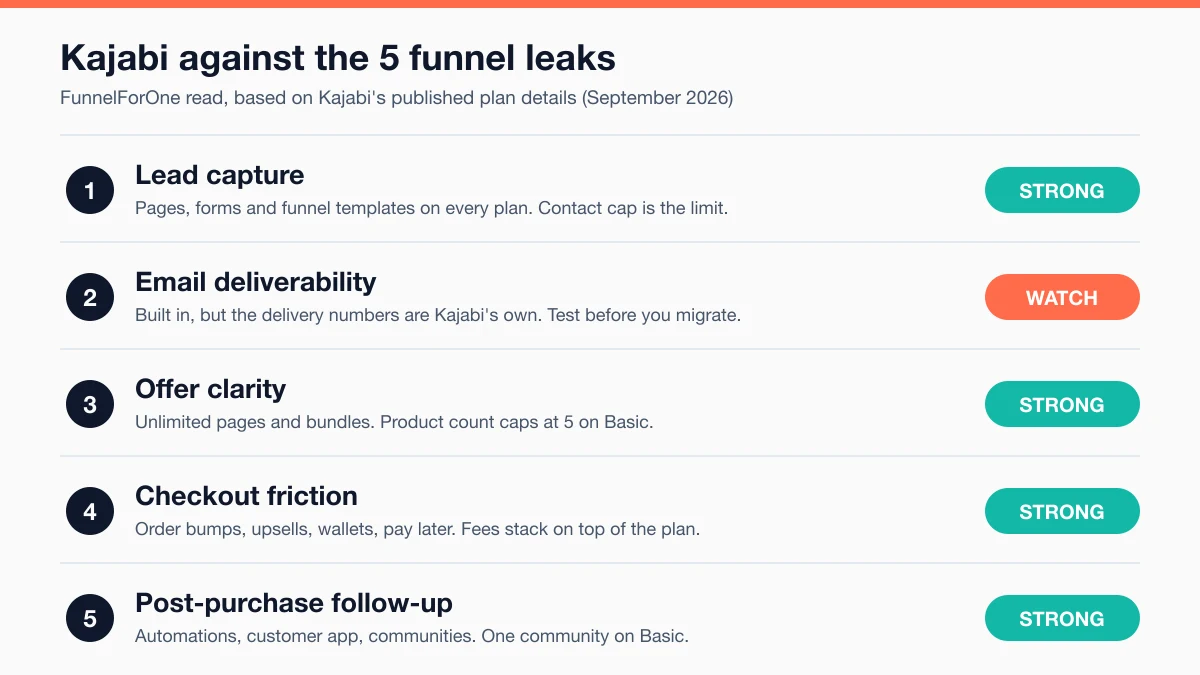
Here is the score before the detail. If you only want plan prices, the Kajabi pricing breakdown covers each tier. If you are still choosing a platform, start with the Kajabi competitors comparison.
Does Kajabi Fix the Lead Capture Leak?
Kajabi lists funnels, websites, landing pages, and marketing emails as included features, per kajabi.com/pricing, and its ready-made funnel templates arrive with copy and emails assembled. The real limit on lead capture is the contact cap: 2,500 on Basic, 25,000 on Growth, 100,000 on Pro.
Lead capture tools are not gated by plan tier. A Basic user gets the same page tools as a Pro user. What changes is how many contacts you can hold.
That cap matters more than it looks. A list growing by 200 subscribers a month reaches 2,500 in about 12 months, starting from zero. That is illustrative arithmetic, not a forecast. A webinar funnel that adds leads faster will hit the ceiling sooner, and then the plan decision is forced on you.
Design freedom is the other tradeoff. Kajabi’s funnels page promises you can go live “in minutes” with structure and copy already in place. That speed comes from templates. Uscreen, a competing platform, quotes customers who say landing and checkout pages leave little room to customize blocks. LitExtension, which rates Kajabi favorably, also notes it ran into some design limitations.
Kajabi Analytics is worth knowing about here. Per kajabi.com/features/analytics, it shows which landing pages convert and where students drop off inside a course. That is the kind of data a diagnostic approach needs.
The diagnostic read: if visitors land on your page and do not opt in, the fix is usually the promise and the headline, not the builder. A template will not write a lead magnet people want. Kajabi is strong at capture mechanics and neutral on capture strategy.
How Reliable Is Kajabi’s Email Deliverability and Automation?
Kajabi’s email marketing is built in, and Kajabi says it sends more than 10 billion emails a year with a 99% deliverability rate, per kajabi.com/features/email-marketing. Those are Kajabi’s own figures, not an independent measurement of inbox placement.
Deliverability is the leak you cannot see from inside the tool. The numbers are worth reading carefully. Vendors often measure “delivered” as accepted by the receiving mail server, which is not the same as landing in the inbox instead of spam. Kajabi’s page does not say which definition it uses.

What decides inbox placement is mostly outside the platform: how clean your list is, how often people open, and how your sending domain is set up. If your open rate has been sliding, moving to a new tool will not reverse that by itself.
Automation depth is the other question. Kajabi’s automations follow a “when this happens, do this” pattern. Its communities page says automations can trigger when someone joins, engages, or goes quiet. Advanced automations are reported to start at Growth, per LitExtension.
How to check before you pay: use the 14-day trial to build your most complex real sequence, the one with the most conditions. If it needs branching by clicks or purchase history and Kajabi cannot do it, you have your answer at no cost. Then send a test to your own Gmail and Outlook addresses and see where it lands.
Most solo creators do not need a long automation. Three emails is a fair starting point. Add more only if the data tells you to.
Does Kajabi Make Your Offer Clear?
Kajabi lets you sell courses, memberships, coaching, digital downloads, communities, and podcasts from one account, and bundle them into a single checkout with Kajabi cart, per kajabi.com/features/payments. The plan limit that matters is products: 5 on Basic, 50 on Growth, unlimited on Pro.
Offer clarity means your sales page, price, and checkout tell one consistent story. Kajabi helps because everything lives under one login. Its communities page lists “unified member profiles across products,” so a buyer who joins a course and a community is one person in your records, not two.
The Basic plan’s 5-product cap is the trap. A creator with one flagship course, a bonus workshop, a template pack, a coaching option, and a community can feel that ceiling quickly. Before you pick Basic, check how Kajabi counts bundles, communities, and free lead magnets toward the cap.
Kajabi cannot tell you whether the offer is right. If nobody buys on a clean page, the leak is upstream: the promise, the price, or the audience. Paying for a bigger plan to get more product slots will not fix that.
How Much Checkout Friction Does Kajabi Remove, and What Does It Cost?
Kajabi Payments charges 2.9% + $0.30 per transaction on Basic, 2.8% + $0.30 on Growth, and 2.7% + $0.30 on Pro for US entities, per kajabi.com/pricing. Checkout also supports order bumps, upsells, downsells, digital wallets, and pay-later options, so friction is low and the cost is in the fees.
On friction, Kajabi does the work. Per Kajabi’s payments page, checkout accepts major cards, Apple Pay, Google Pay, Afterpay, and Klarna. Wallets and pay-later options remove steps at the moment a buyer decides. Kajabi Sales Tax calculates tax at checkout and produces filing reports, which takes over a chore that can put solo creators off selling across regions.
The cost sits in the fees. Here is what one $197 course sale looks like on Kajabi’s published rates:
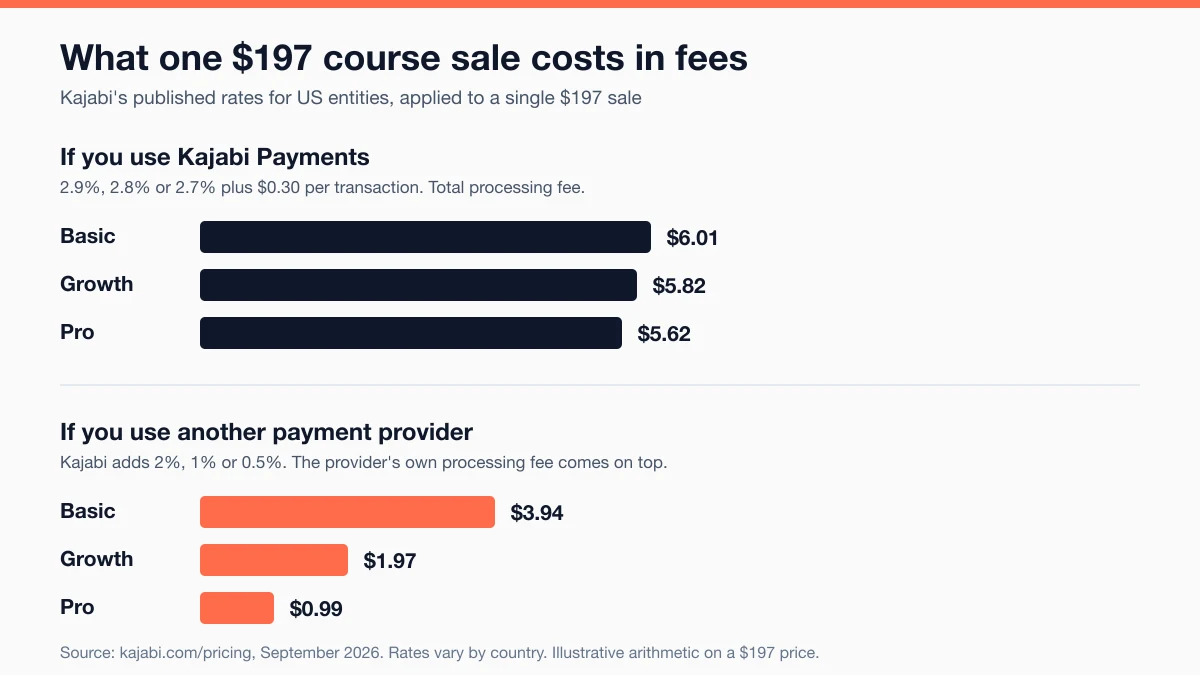
With Kajabi Payments on Basic, the processing fee is about $6.01: 2.9% is $5.71, plus $0.30. If you use another payment provider instead, Kajabi adds its own 2% on Basic, about $3.94 on that sale, and the provider still takes its own cut. Kajabi’s footnote says the third-party fee excludes PayPal and Kajabi Payments, so confirm how PayPal sales are billed on your account.
Rates are for US entities. Per Kajabi, rates vary by country, so check the country table if you sell from outside the US.
Kajabi’s payments page quotes one customer who reports a 13.12% lift in conversion rate after switching processors. That is a single vendor-published testimonial. Treat it as a best case, not a forecast.
Does Kajabi Handle Post-Purchase Follow-Up?
Kajabi includes automations, communities, and a customer app for members, with 1 community on Basic, 3 on Growth, and Access Groups on Pro, per kajabi.com/pricing. Community access can be tied to product purchases, per Kajabi’s communities page.
Post-purchase is where solo funnels quietly lose money. A buyer pays, gets no onboarding, and never comes back for the next offer. Kajabi is well built for this leak because the buyer record, the product, the community, and the email all live in one place. Buying a course can unlock a community space with no manual step.
The plan gate is community count. One community suits a single-course business. Multiple cohorts or membership levels need Growth or Pro.
A note on the branded mobile app. The pricing page lists a “Branded Mobile App” at a $199 per month value, and Kajabi describes Pro as built for businesses that want their own app. Confirm which plan includes it before you count on it.
A simple starting point for follow-up: a welcome email that tells the buyer what to do first, a check-in after their first win, and a request for feedback. Three emails, each with one job.
Kajabi Plans at a Glance
| Plan | Price | Best For | Key Limit |
|---|---|---|---|
| Basic | $179/month, or $143/month billed annually ($1,716 per year) | One core product and a list under 2,500 | 5 products, 2,500 contacts, 2 admin users, 1 community |
| Growth | $249/month, or $199/month billed annually ($2,388 per year) | A small catalog, a growing list, and a helper on the team | 50 products, 25,000 contacts, 11 admin users, 3 communities |
| Pro | $499/month, or $399/month billed annually ($4,788 per year) | A large catalog, a small team, or a branded app | Unlimited products, 100,000 contacts, 26 admin users, Access Groups |
Prices and limits per kajabi.com/pricing, checked September 2026. Kajabi offers a 14-day free trial and a 30-day money-back guarantee, per the same page. Extra contacts cost more; see the Kajabi pricing breakdown.
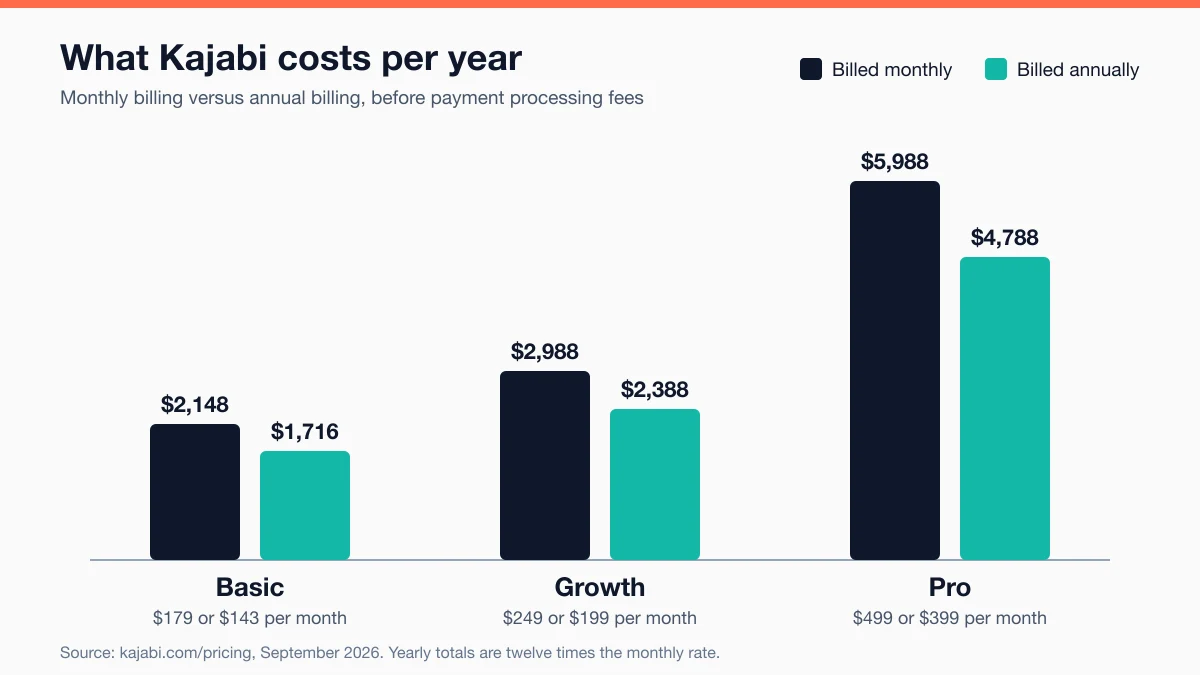
Put the cost in terms of your own sales. Basic on annual billing is $1,716 a year. At a $197 course price, that is 9 sales just to cover the subscription (1,716 divided by 197 is 8.7). On monthly billing, $2,148 needs 11 sales. That is before payment fees, ad spend, or your time.
If you have read older reviews with lower entry prices, note that LitExtension reports Kajabi raised prices in 2026 and dropped its former Kickstarter plan.
Who Should Use Kajabi, and Who Should Skip It?
Kajabi fits creators who have already sold their offer and now lose time and leads across too many tools. It is a poor fit for creators still testing demand, or anyone whose funnel is a bio link and one download. Based on our research of Kajabi’s published plans and third-party reviews.
Use Kajabi if:
- You have proof the offer sells and your problem is tool sprawl, not demand
- You sell more than one kind of product, such as a course plus a community plus coaching
- You run everything yourself and would rather pay than integrate five tools
- Your list will stay under the plan’s contact cap for the next year
Skip Kajabi if:
- You are pre-revenue. $179 a month is a lot to commit before you know the offer sells. The Systeme.io review and the Podia review cover cheaper places to start.
- Your traffic comes from a social bio link and you sell one simple digital product. The Stan Store vs Kajabi comparison explains why a lighter tool fits that shape better.
- You need pixel-level page control or deep email branching. Those needs point to dedicated tools rather than an all-in-one.
- You only need course hosting. The Teachable alternatives roundup covers narrower options.
The 14-day test. Use the free trial as a diagnostic, not a tour. Build your real opt-in page. Build your most complex email sequence. Run a test checkout at your real price with an order bump. Send a test email to your own inboxes. If any of the four blocks you, you have your answer without paying a month.
Kajabi is a strong answer to one leak: too many tools between the visitor and the buyer. It is a weak answer to every other leak.
Frequently Asked Questions
Is Kajabi worth it for beginners?
Only if you have already validated your offer. Kajabi’s $179 per month Basic plan gives you real infrastructure, but that is a meaningful monthly cost before you know people will pay. Creators still testing a first idea usually get more from a cheaper, narrower tool, then move to Kajabi when sales justify it.
Does Kajabi have a free plan?
No. Kajabi’s pricing page lists Basic, Growth, and Pro, with a 14-day free trial and a 30-day money-back guarantee, per kajabi.com/pricing. Use the trial to test your real funnel, not to browse.
Does Kajabi take a cut of my sales?
Kajabi says it takes no revenue share, per its pricing page. Payment processing fees still apply. Kajabi Payments charges 2.9% + $0.30 on Basic, dropping to 2.7% + $0.30 on Pro for US entities. If you use another provider, Kajabi adds 2% on Basic down to 0.5% on Pro, plus the provider’s own fees.
What is the biggest downside of Kajabi?
Price and flexibility. Entry cost is $179 per month, and third-party reviewers, including Uscreen and LitExtension, mention limited design freedom on pages. The contact cap on Basic is the third one to watch, because a growing list forces an upgrade.
Can Kajabi replace Kit (ConvertKit) or Mailchimp?
Kajabi says it does, per its email marketing page. Whether it does for you depends on how complex your sequences are. Build your most demanding sequence during the free trial before you move a list. If Kajabi handles it, you can drop a subscription. If not, keep the dedicated tool.
Keep Reading
What to Do Next
Choose the path that fits where you are right now.
Get the Free Solo Funnel Diagnostic
Get the free Solo Funnel Diagnostic. 12 diagnostic questions. Scored in 10 minutes. Tells you exactly which stage is broken and what to fix first.
Send Me the Diagnostic